碎碎念
上班已经一个星期了,也算是正式踏入牛马生活啦。虽然每天都有点忙、有点累,但整体体验还是挺有意思的。工作节奏紧凑却充实,不仅能认识许多经验丰富、技术过硬的大佬们,还能在他们身上学到不少实用的知识与工作思维,感觉自己的成长速度也在加快。希望自己能稳步前进,顺利度过实习期,早日正式成为团队的一员!
前些天,发哥催我赶紧做一个赞赏页。我本来一直拖着没动手,结果人家咖啡都先送过来了😂。于是想着既然承诺了,就得说到做到。趁着上周末有空,我花了点时间把赞赏页面打磨出来,不仅实现了预期的效果,还添加了一些小细节,让页面更有温度。这个页面既是对支持我的朋友们的一份感谢,也算是给博客增添了一点仪式感。
本站链接 · 来自本站,本站可确保其安全性,请放心点击跳转清羽飞扬の赞赏页面LiuShens' Blog展示效果
本次魔改主要涉及两个部分。首先是侧边栏的轮播展示,可以循环显示所有赞赏者。侧边栏的数据为随机排序,最多显示20位赞赏者;如果超过这个数量,会在最后自动添加一个“更多”按钮,点击即可跳转至完整的赞赏页面。当鼠标悬停时,轮播会自动暂停。整个轮播效果未引入任何第三方库,对性能几乎没有影响。
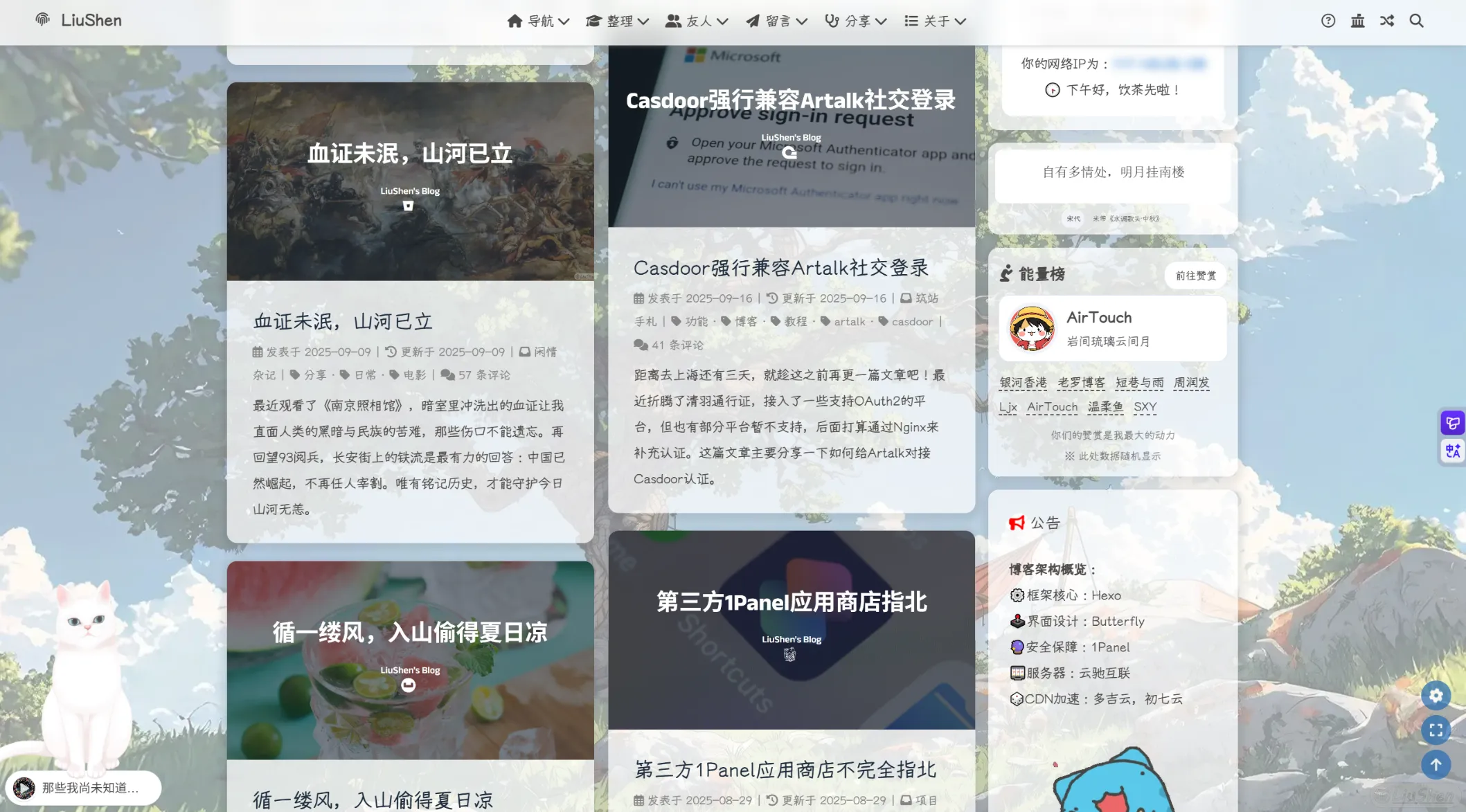
第二个部分是赞赏页面,用于集中展示所有赞赏者。这个页面我没有使用任何 JS,完全是纯静态设计,不仅加载更快,还能为赞赏者带来一定的SEO加成,也算是我对他们的一点小小回馈。
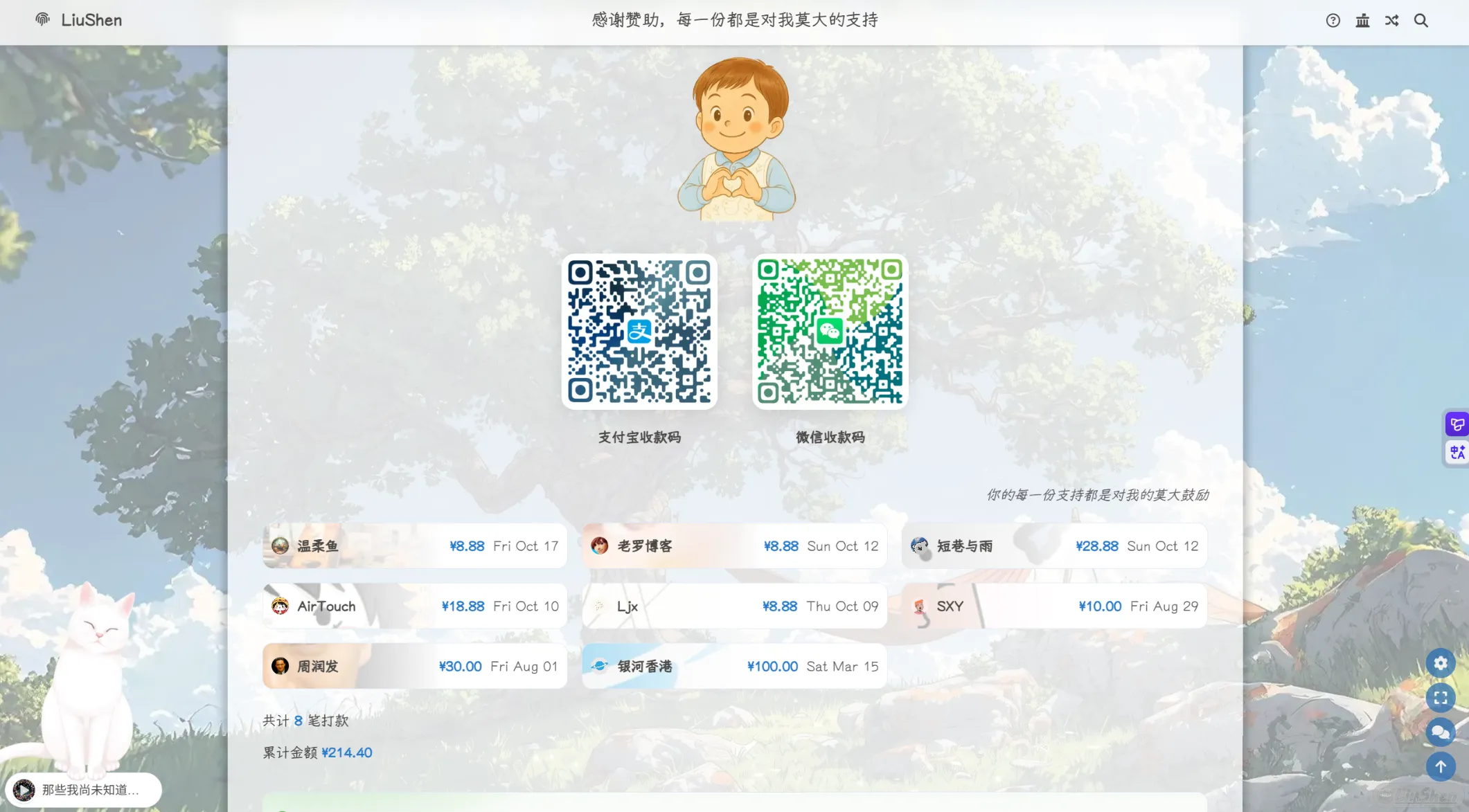
不过由于没有使用 JS,所以暂时无法实现分页、动态加载等功能,如果人数过多可能导致列表过长。不过考虑到我的友链页面都已经挺长了(笑),这里应该问题不大——反正也不太可能有那么多人赞赏我吧QAQ。
效果早已上线本站,欢迎测试,如果有Bug欢迎指出呀!
教程
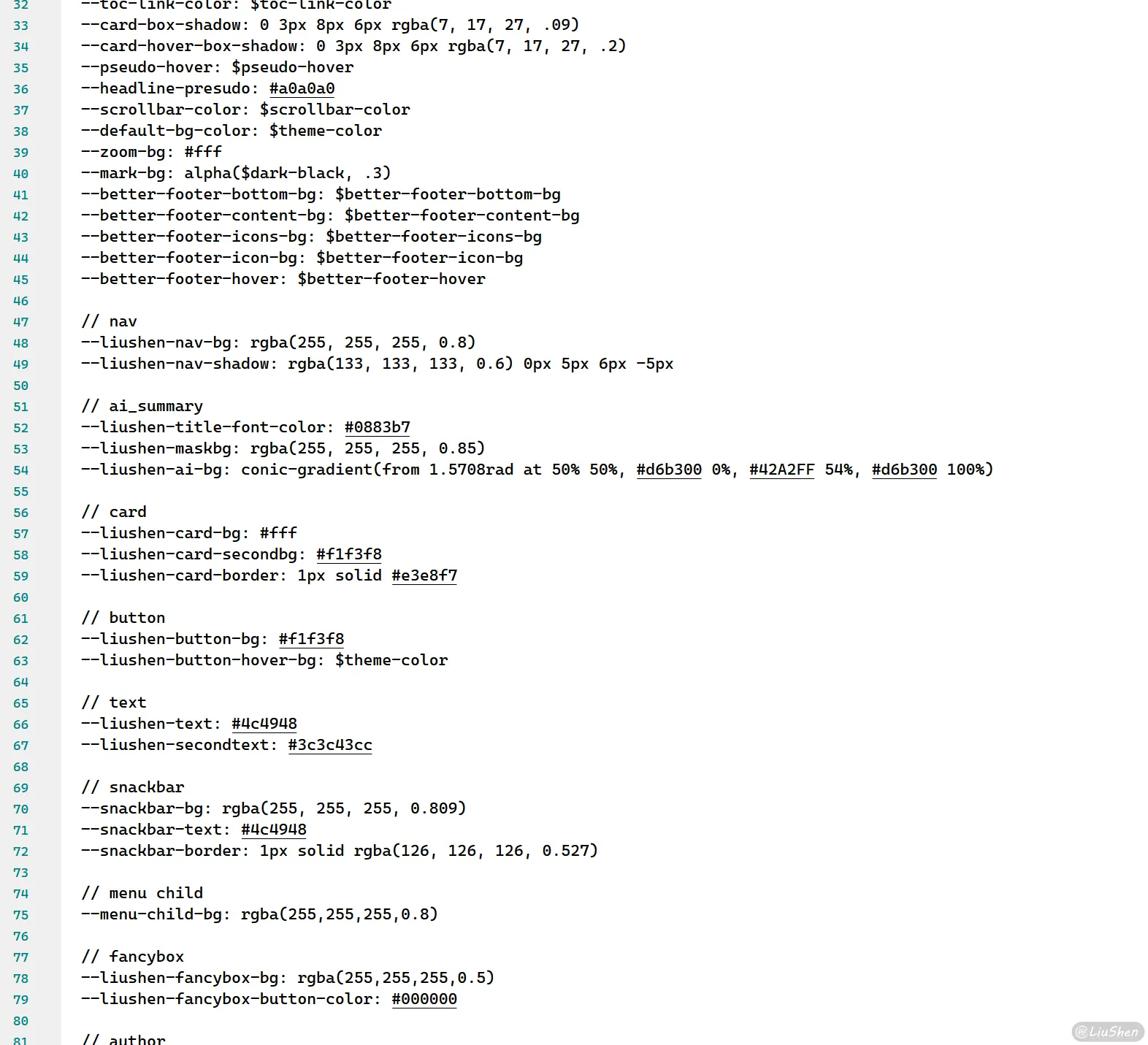
懒得废话了,直接上教程吧,教程也分为两部分实现,首先需要说明,在本主题中有一些博主自定义的变量,如果直接搬过去可能导致无法实现想要的功能,本次教程涉及到的样式表如下:
:root {
  /* ========== nav ========== */
  --liushen-nav-bg: rgba(255, 255, 255, 0.8);
  --liushen-nav-shadow: rgba(133, 133, 133, 0.6) 0px 5px 6px -5px;

  /* ========== ai_summary ========== */
  --liushen-title-font-color: #0883b7;
  --liushen-maskbg: rgba(255, 255, 255, 0.85);
  --liushen-ai-bg: conic-gradient(
    from 1.5708rad at 50% 50%,
    #d6b300 0%,
    #42a2ff 54%,
    #d6b300 100%
  );

  /* ========== card ========== */
  --liushen-card-bg: #fff;
  --liushen-card-secondbg: #f1f3f8;
  --liushen-card-border: 1px solid #e3e8f7;

  /* ========== button ========== */
  --liushen-button-bg: #f1f3f8;
  --liushen-button-hover-bg: var(--theme-color);

  /* ========== text ========== */
  --liushen-text: #4c4948;
  --liushen-secondtext: #3c3c43cc;
}

[data-theme="dark"] {
  /* ========== nav ========== */
  --liushen-nav-bg: rgba(18, 18, 18, 0.8);
  --liushen-nav-shadow: rgba(133, 133, 133, 0) 0px 5px 6px -5px;

  /* ========== ai_summary ========== */
  --liushen-maskbg: rgba(0, 0, 0, 0.85);
  --liushen-ai-bg: conic-gradient(
    from 1.5708rad at 50% 50%,
    rgba(214, 178, 0, 0.46) 0%,
    rgba(66, 161, 255, 0.53) 54%,
    rgba(214, 178, 0, 0.49) 100%
  );

  /* ========== card ========== */
  --liushen-card-bg: #2d2d2d;
  --liushen-card-secondbg: #3e3f41;
  --liushen-card-border: 1px solid #42444a;

  /* ========== button ========== */
  --liushen-button-bg: #30343f;
  --liushen-button-hover-bg: var(--theme-color);

  /* ========== text ========== */
  --liushen-text: #ffffffb3;
  --liushen-secondtext: #a1a2b8;
}可以按照要求自行添加到对应的blog\themes\liushen\source\css\_mode\darkmode.styl和blog\themes\liushen\source\css\_global\index.styl中,这两个部分对应暗色和亮色的配置:
下面开始正文。
赞赏数据
展示赞赏者的前提是,得有赞赏数据,所以我们先来构建该数据,创建文件[根目录]/source/_data/rewards.yml,写入以下格式的内容:
donate:
  # 支付宝收款码
  alipay:
    name: 支付宝收款码
    image: /config/img/alipay.png
  # 微信收款码
  wechat:
    name: 微信收款码
    image: /config/img/wechat.png
  thank_img: https://p.liiiu.cn/i/2025/10/10/68e9199157351.webp
  # 赞赏页面链接
  page_url: /rewards/
  # 赞赏者列表
  list:
    - name: 银河香港
      avatar: https://p.liiiu.cn/i/2025/02/26/67bec7d0eb734.webp
      website:
      date: 2025-03-15
      amount: ¥100.00
      description: 你我皆是生活银河中的闪耀星辰
    - name: 周润发
      avatar: https://p.liiiu.cn/i/2025/03/20/67dbe8c6a6221.webp
      website: https://blog.zrf.me
      date: 2025-08-01
      amount: ¥30.00
      description: 收录开源,好用的互联网项目~
    - name: SXY
      avatar: https://p.liiiu.cn/i/2025/10/11/68e93a9ccee45.webp
      website:
      date: 2025-08-29
      amount: ¥10.00
      description: 地球与物理专业的大三学生
    - name: Ljx
      avatar: https://p.liiiu.cn/i/2025/10/09/68e7d8ed2a70b.webp
      website: https://blog.ljx.icu/
      date: 2025-10-09
      amount: ¥8.88
      description: 一个无聊无趣的人~
    - name: AirTouch
      avatar: https://p.liiiu.cn/i/2025/07/18/687a369fc3610.webp
      website: https://www.xsl.im/
      date: 2025-10-10
      amount: ¥18.88
      description: 岩间琉璃云间月
    - name: 短巷与雨
      avatar: https://p.liiiu.cn/i/2024/11/18/673ac90233753.webp
      website: https://space.xsl.im/
      date: 2025-10-12
      amount: ¥28.88
      description: 为学日益,为道日损。
    - name: 老罗博客
      avatar: https://p.liiiu.cn/i/2025/06/01/683bc6062b113.webp
      website: https://www.luosir.cn
      date: 2025-10-12
      amount: ¥8.88
      description: 人生就是折腾
    - name: 温柔鱼
      avatar: https://p.liiiu.cn/i/2025/10/08/68e5e1f17ed12.webp
      website: https://blog.vrou.cn
      date: 2025-10-17
      amount: ¥8.88
      description: "NULL"
    - name: 不知名朋友
      avatar: https://p.liiiu.cn/i/2025/10/11/68e93a9ccee45.webp
      website:
      date: 2025-10-19
      amount: ¥2.00
      description: 感谢朋友的赞助~
其中列表的时间顺序建议上面最早,下面最新,因为我懒得写排序了嘻嘻,所以直接倒序,方便实用(反正每次添加都是往文件底部添加啦)。
有了数据,我们就开始添加到页面上吧~
侧边栏
创建文件[根目录]\themes\liushen\layout\includes\widget\card_rewards.pug,写入以下内容:
.card-widget.card-reward
  .item-headline
    .headline-content
      i.fa-solid.fa-person-praying
      span 能量榜
    .show-more-inline
      - var pageUrl = site.data.rewards.donate.page_url || '/reward/'
      a(href=url_for(pageUrl) class="btn-show-more-inline")
        span 前往赞赏
  .item-content
    if site.data.rewards && site.data.rewards.donate && site.data.rewards.donate.list.length > 0
      - var allSponsors = site.data.rewards.donate.list.slice()
      - allSponsors.sort(function() { return Math.random() - 0.5 })
      - var carouselSponsors = allSponsors.slice(0, 40)
      - var listSponsors = allSponsors.slice(0, 20)

      if carouselSponsors.length > 0
        .top-sponsor-carousel
          .carousel-container
            .carousel-item
              a.sponsor-link-card(target="_blank" rel="nofollow noopener")
                .sponsor-avatar
                  img.sponsor-avatar-img(src=url_for(carouselSponsors[0].avatar) alt=carouselSponsors[0].name onerror=`this.onerror=null;this.src='` + url_for(theme.error_img.flink) + `'`)
                .sponsor-info
                  .sponsor-name= carouselSponsors[0].name
                  .sponsor-desc= carouselSponsors[0].description

        if listSponsors.length > 1
          .sponsors-list
            each sponsor in listSponsors
              if sponsor.website
                a.sponsor-item(href=sponsor.website target="_blank" rel="nofollow noopener")
                  .sponsor-small-name= sponsor.name
              else
                .sponsor-item
                  .sponsor-small-name= sponsor.name

            if allSponsors.length > 20
              - var pageUrl = site.data.rewards.donate.page_url || '/reward/'
              a.sponsor-item.more-sponsor(href=url_for(pageUrl) target="_blank" rel="nofollow noopener")
                .sponsor-small-name
                  |  查看更多
                  i.fa-solid.fa-angles-right

          .sponsors-note
            p 你们的赞赏是我最大的动力
            p ※ 此处数据随机显示

        script.
          if (!window.sponsorsData) {
            window.sponsorsData = !{JSON.stringify(carouselSponsors)};
          }

          function initRewardCarousel() {
            const container = document.querySelector('.carousel-container');
            const link = container.querySelector('.sponsor-link-card');
            const avatar = container.querySelector('.sponsor-avatar-img');
            const name = container.querySelector('.sponsor-name');
            const desc = container.querySelector('.sponsor-desc');

            if (!container || sponsorsData.length === 0) return;

            let currentIndex = 0;
            let intervalId = null;
            let isTransitioning = false;

            function updateSponsorInfo(sponsor) {
              if (sponsor.website) {
                link.href = sponsor.website;
                // 确保有链接时移除 pointer-events 样式
                link.style.pointerEvents = '';
                link.style.cursor = 'pointer';
              } else {
                link.removeAttribute('href');
                // 只有在没有链接时才添加 pointer-events: none
                link.style.pointerEvents = 'none';
                link.style.cursor = 'default';
              }

              avatar.src = sponsor.avatar;
              avatar.alt = sponsor.name;

              name.textContent = sponsor.name;
              desc.textContent = sponsor.description;
            }

            function showSponsor(index) {
              if (index < 0 || index >= sponsorsData.length || isTransitioning) return;

              isTransitioning = true;
              const sponsor = sponsorsData[index];

              container.style.opacity = '0';

              setTimeout(() => {
                updateSponsorInfo(sponsor);
                container.style.opacity = '1';
                currentIndex = index;

                setTimeout(() => {
                  isTransitioning = false;
                }, 300);
              }, 300);
            }

            function nextSponsor() {
              const nextIndex = (currentIndex + 1) % sponsorsData.length;
              showSponsor(nextIndex);
            }

            function startAutoPlay() {
              if (intervalId) clearInterval(intervalId);
              intervalId = setInterval(nextSponsor, 3000);
            }

            function stopAutoPlay() {
              if (intervalId) {
                clearInterval(intervalId);
                intervalId = null;
              }
            }

            const carousel = document.querySelector('.top-sponsor-carousel');
            if (carousel) {
              carousel.addEventListener('mouseenter', stopAutoPlay);
              carousel.addEventListener('mouseleave', startAutoPlay);
            }

            container.style.transition = 'opacity 0.3s ease-in-out';

            // 初始化第一个赞助者信息
            updateSponsorInfo(sponsorsData[0]);

            startAutoPlay();

            return {
              showSponsor,
              nextSponsor,
              startAutoPlay,
              stopAutoPlay
            };
          }
          initRewardCarousel();
          //- document.addEventListener("pjax:complete", function() {
          //-   initRewardCarousel();
          //- });
      else
        .no-sponsors
          p 暂无赞助者,成为第一个支持本站的朋友吧!
    else
      .no-sponsors
p 暂无赞助者数据以上为PUG结构,下面添加样式,找到目录[根目录]/themes/liushen/source/css/_layout随便找个地方创建一个styl文件,因为这个文件夹下的所有styl均会被直接渲染到index.css文件中,创建文件后写入以下内容:
#aside-content
    .card-widget.card-reward
        padding: 8px
        .item-headline
            margin: 4px 4px 0 4px
            display: flex
            justify-content: space-between
            align-items: center

            .headline-content
                i
                    font-size: 1.1em

                span
                    font-size: 1em
                    font-weight: 600
                    color: var(--liushen-text)

            .show-more-inline
                .btn-show-more-inline
                    display: inline-flex
                    align-items: center
                    padding: 4px 12px
                    background-color: var(--liushen-card-bg)
                    border: var(--liushen-card-border)
                    color: var(--liushen-text)
                    text-decoration: none
                    border-radius: 15px
                    font-size: 12px
                    font-weight: 500
                    transition: all 0.3s ease

                    span
                        margin-left: 0

                    &:hover
                        background-color: var(--default-bg-color)
                        color: #fff
                        transform: translateY(-1px)
                        box-shadow: 0 4px 8px rgba(0, 0, 0, 0.15)

        .item-content
            margin: 0 4px 4px 4px

            .top-sponsor-carousel
                // position: relative
                margin-bottom: 15px

                .carousel-container
                    .carousel-item
                        width: 100%
                        display: flex !important
                        align-items: center
                        padding: 8px
                        background-color: var(--liushen-card-bg)
                        border-radius: 12px
                        border: var(--liushen-card-border)

                        &.carousel-item-new
                            animation: slideIn 0.5s ease-out

                        a
                            display: flex
                            align-items: center
                            text-decoration: none
                            color: var(--liushen-text)
                            width: 100%

                        .sponsor-avatar
                            width: 60px
                            height: 60px
                            margin-right: 10px

                            img
                                width: 100%
                                height: 100%
                                border-radius: 50%
                                object-fit: cover
                                border: 4px solid var(--liushen-card-secondbg)

                        .sponsor-info
                            min-width: 0

                            .sponsor-name
                                font-size: 18px
                                font-weight: 600
                                line-height: 1
                                margin-bottom: 12px
                                color: var(--liushen-text)
                                overflow: hidden
                                text-overflow: ellipsis
                                white-space: nowrap

                            .sponsor-desc
                                font-size: 14px
                                line-height: 1
                                color: var(--liushen-secondtext)
                                overflow: hidden
                                text-overflow: ellipsis
                                white-space: nowrap

            .sponsors-list
                display: flex
                flex-wrap: wrap
                gap: 10px
                margin-bottom: 12px

                .sponsor-item
                    display: flex
                    align-items: center
                    line-height: 1.2
                    text-decoration: underline
                    text-underline-offset: 4px
                    text-decoration-color: var(--liushen-text)
                    text-decoration-style: dashed

                    color: var(--liushen-text)
                    transition: all 0.2s ease
                    white-space: nowrap
                    border: 1px solid transparent

                    &:hover
                        color: var(--default-bg-color)
                        text-decoration-color: var(--default-bg-color)
                        transform: translateY(-2px)

                    .sponsor-small-name
                        font-size: 14px
                        font-weight: 500

            .sponsors-note
                text-align: center
                font-size: 12px
                color: var(--liushen-secondtext)
                opacity: 0.8

                p
                    margin: 0

            .no-sponsors
                text-align: center
                padding: 20px
                color: var(--liushen-secondtext)

                p
                    font-size: 14px

@keyframes slideIn
    from
        opacity: 0
        transform: translateX(20px)
    to
        opacity: 1
        transform: translateX(0)
其中变量请看教程顶部的变量表,这里不再细说。
赞赏页面
如果不出所料,侧边栏应该实现了,下面实现赞赏页面,由于不涉及Javascript,所以实现起来可简单多了,还是一样,首先添加Pug页面结构文件,创建blog\themes\liushen\layout\includes\page\rewards.pug,写入以下内容:
#article-container
  if top_img === false
    h1.page-title= page.title

  .reward-page
    // 感谢图片
    .thank-image
      img.no-lightbox(
        src=site.data.rewards.donate.thank_img
        alt="感谢"
        onerror=`this.onerror=null;this.src='` + url_for(theme.error_img.post) + `'`
      )

    // 收款码区域
    .payment-codes
      .payment-item.alipay
        .payment-content
          .payment-image
            img(src=site.data.rewards.donate.alipay.image alt=site.data.rewards.donate.alipay.name)
          .payment-info
            .payment-name= site.data.rewards.donate.alipay.name
            //- .payment-desc 支付宝扫一扫
      .payment-item.wechat
        .payment-content
          .payment-image
            img(src=site.data.rewards.donate.wechat.image alt=site.data.rewards.donate.wechat.name)
          .payment-info
            .payment-name= site.data.rewards.donate.wechat.name
            //- .payment-desc 微信扫一扫

    // 赞赏者列表
    .sponsors-list
      .sponsors-header
        .sponsors-description
          p 你的每一份支持都是对我的莫大鼓励

      .sponsors-container
        if site.data.rewards && site.data.rewards.donate && site.data.rewards.donate.list.length > 0
          // 反转列表,因为最新的在最后
          - var sortedSponsors = site.data.rewards.donate.list.slice().reverse()

          // 计算统计数据
          - var totalCount = sortedSponsors.length
          - var totalAmount = 0
          - sortedSponsors.forEach(function(sponsor) {
          -   var amount = parseFloat(String(sponsor.amount).replace('¥', ''));
          -   if (!isNaN(amount)) {
          -     totalAmount += amount;
          -   }
          - })

          each sponsor, index in sortedSponsors
            .sponsor-item
              if sponsor.website
                a.sponsor-card(href=sponsor.website target="_blank" rel="noopener noreferrer" style="text-decoration: none;")
                  .background-img(
                    style=`background-image:url(${sponsor.avatar});background-repeat:no-repeat;background-size:cover;background-position:right;mask-image:linear-gradient(to left, transparent, black);-webkit-mask-image:linear-gradient(to left, transparent, black);`
                    onerror=`this.onerror=null;this.style.backgroundImage='url("` + url_for(theme.error_img.post_page) + `")'`
                  )
                  .sponsor-card-left
                    .sponsor-avatar-title
                      img.no-lightbox(
                        src=sponsor.avatar
                        alt=''
                        onerror=`this.onerror=null;this.src='` + url_for(theme.error_img.post_page) + `'`
                      )
                      .sponsor-name= sponsor.name
                    .sponsor-desc= sponsor.description
                  .sponsor-card-right
                    .sponsor-amount= sponsor.amount
                    .sponsor-date= sponsor.date ? String(sponsor.date).slice(0, 10) : ''
              else
                .sponsor-card(style="pointer-events: none; cursor: default;")
                  .background-img(
                    style=`background-image:url(${sponsor.avatar});background-repeat:no-repeat;background-size:cover;background-position:right;mask-image:linear-gradient(to left, transparent, black);-webkit-mask-image:linear-gradient(to left, transparent, black);`
                    onerror=`this.onerror=null;this.style.backgroundImage='url("` + url_for(theme.error_img.post_page) + `")'`
                  )
                  .sponsor-card-left
                    .sponsor-avatar-title
                        img.no-lightbox(
                          src=sponsor.avatar
                          alt=''
                          onerror=`this.onerror=null;this.src='` + url_for(theme.error_img.post_page) + `'`
                        )
                        .sponsor-name= sponsor.name
                    .sponsor-desc= sponsor.description
                  .sponsor-card-right
                    .sponsor-amount= sponsor.amount
                    .sponsor-date= sponsor.date ? String(sponsor.date).slice(0, 10) : ''

        else
          .no-sponsors
            p 暂无赞赏者数据

      // 统计信息
      .statistics
        .total-count 共计
          span.stat-number= totalCount
          |  笔打款
        .total-amount 累计金额
          span.stat-number ¥#{totalAmount.toFixed(2)}

!= page.content然后修改blog\themes\liushen\layout\page.pug文件,添加上Rewards页面的布局:
extends includes/layout.pug

block content
  - const noCardLayout = ['shuoshuo', '404'].includes(page.type) ? 'nc' : ''
  - var commentsJsLoad = false

  mixin commentLoad
    if page.comments !== false && theme.comments.use
      - commentsJsLoad = true
      !=partial('includes/third-party/comments/index', {}, {cache: true})

  #page(class=noCardLayout)
    if top_img === false && page.title
      page-title= page.title

    case page.type
      when 'tags'
        include includes/page/tags.pug
        +commentLoad
      when 'link'
        include includes/page/flink.pug
        +commentLoad
+    when 'rewards'
+      include includes/page/rewards.pug
+      +commentLoad
      when 'categories'
        include includes/page/categories.pug
        +commentLoad
      when 'devices'
        include includes/page/devices.pug
      when 'shuoshuo'
        include includes/page/shuoshuo.pug
      when 'about'
        include includes/page/about.pug
      when '404'
        include includes/page/404.pug
      default
        include includes/page/default-page.pug
        +commentLoad
删掉加号后自行注意缩进,这里缩进应该挺明显的吧,所以就不多说啦。
页面结构添加完成,下面实现样式,创建文件blog\themes\liushen\source\css\_page\rewards.styl,写入以下内容:
#article-container
  .reward-page
    // 感谢图片
    .thank-image
      img
        box-shadow: none
        height: 200px
      .img-alt
        display: none

    // 收款码区域
    .payment-codes
      display: flex
      justify-content: center
      gap: 40px
      margin: 30px 0
      flex-wrap: wrap

      @media screen and (max-width: 768px)
        gap: 20px

      .payment-item
        text-align: center
        transition: transform 0.3s ease

        &:hover
          transform: translateY(-5px)

        .payment-content
          display: flex
          flex-direction: column
          align-items: center
          gap: 15px

        .payment-image
          width: 180px
          height: 180px
          border-radius: 15px
          overflow: hidden
          box-shadow: 0 5px 20px rgba(0, 0, 0, 0.1)

          @media screen and (max-width: 768px)
            width: 150px
            height: 150px

          img
            width: 100%
            height: 100%
            object-fit: cover

        .payment-info
          .payment-name
            font-size: 16px
            color: var(--liushen-text)
            font-weight: 600
            margin-bottom: 5px

    // 赞赏者列表
    .sponsors-list
      margin-bottom: 30px

      // 头部区域
      .sponsors-header
        display: flex
        flex-direction: row-reverse

        .sponsors-description
          p
            font-size: 16px
            color: var(--liushen-secondtext)
            font-style: italic

      .sponsors-container
        display: flex
        flex-wrap: wrap
        justify-content: flex-start
        margin: -8px // 抵消子元素的 margin

        .sponsor-item
          margin: 8px // 统一的 margin
          // 默认宽度 (1列)
          width: "calc(100% - %s)" % (8px * 2)

          // 800px 及以上 (2列)
          @media screen and (min-width: 800px)
            width: "calc(100% / 2 - %s)" % (8px * 2)

          // 1200px 及以上 (3列)
          @media screen and (min-width: 1200px)
            width: "calc(100% / 3 - %s)" % (8px * 2)

          background-color: var(--liushen-card-bg)
          border: var(--liushen-card-border)
          border-radius: 12px
          transition: all 0.3s ease
          overflow: hidden

          &:hover
            transform: translateY(-2px)
            .background-img
              opacity: 0.5
              transform: translateX(-50%) translateY(-50%) scale(1.3) !important

            .sponsor-avatar-title
                opacity: 0 !important
            .sponsor-desc
                opacity: 1 !important


          .sponsor-card
            display: flex
            justify-content: space-between
            height: 52px
            width: 100%
            align-items: center
            padding: 10px
            transition: all 0.3s ease
            position: relative

            .background-img
              position: absolute
              transform: translateX(-50%) translateY(-50%)
              width: 400px
              height: 400px
              border-radius: 50%
              transition: all 0.3s ease
              opacity: 0.7
              z-index: 0
              top: 50%
              left: 10px

            .sponsor-card-left
              display: flex
              z-index: 1
              align-items: center
              gap: 15px
              flex: 1
              min-width: 0

              .sponsor-avatar-title
                display: flex
                height: 100%
                align-items: center
                gap: 10px
                opacity: 1
                transition: all 0.3s ease

                img
                  width: 20px
                  margin: 0
                  height: 20px
                  border-radius: 50%
                  object-fit: cover

                .sponsor-name
                  font-size: 16px
                  font-weight: 600
                  color: var(--liushen-text)
                  transition: all 0.3s ease
                  white-space: nowrap
                  overflow: hidden
                  text-overflow: ellipsis

              .sponsor-desc
                position: absolute
                transform: translateY(-50%)
                z-index: 1
                left: 20px
                top: 50%
                font-size: 16px
                font-weight: 600
                color: var(--liushen-text)
                opacity: 0
                transition: all 0.3s ease
                white-space: nowrap
                overflow: hidden
                text-overflow: ellipsis
                max-width: calc(100% - 180px)

            .sponsor-card-right
              text-align: right
              display: flex
              gap:10px

              .sponsor-amount
                font-size: 16px
                font-weight: 600
                line-height: 1
                color: var(--default-bg-color)

              .sponsor-date
                font-size: 16px
                line-height: 1
                color: var(--liushen-secondtext)

                .sponsor-card:hover &
                  color: rgba(255, 255, 255, 0.8)

      .statistics
        display: flex
        flex-direction: column
        gap: 5px
        font-size: 16px
        color: var(--liushen-text)
        margin-top: 20px
        .stat-number
          font-weight: 600
          color: var(--default-bg-color)

    // 无数据提示
    .no-sponsors
      text-align: center
      padding: 50px
      color: var(--liushen-secondtext)

      p
        font-size: 16px
        margin: 0

// 定义渐入动画
@keyframes fadeInUp
  from
    opacity: 0
    transform: translateY(20px)
  to
    opacity: 1
transform: translateY(0)页面渲染结构,页面样式均写完了,我们如何定位该页面的位置呢?在source文件夹下创建Rewards文件夹,内部创建index.md文件,写入以下内容:
---
title: 感谢赞助,每一份都是对我莫大的支持
date: 2018-06-07 22:17:49
type: "rewards"
aside: false
---

感谢每一份慷慨的赞赏,它不仅是支持,更是我前行路上温暖的光。这份心意我已悉心珍藏,会化作动力,努力为大家创造更多价值💗

**【温馨提示】** 如果您在赞赏时,能留下备注或在下方评论区说一声,就能方便我将这份心意与您对应上,为您记录在专属的感谢名单里。期待与您相遇!注意添加顶部的type: "rewards",这一句是关键!
再次渲染,访问对应目录,应该就可以看见啦,教程完结!
总结
总体来说,还是要由衷地感谢所有赞赏和支持我的朋友们。无论是否打赏过,我都会坚持把这个小站继续维护下去。如今已经踏入职场,我也更有能力去守护这片属于自己的“小破站”。我并不是为了任何回报,只是想在浩瀚的互联网中,留下一方属于自己的净土,一个可以静下心来书写、表达、交流的地方。更何况,这片净土让我结识了那么多温暖可爱的朋友们,这本身就是最珍贵的馈赠。
接下来,我可能会逐步放弃使用 Hexo,转向一个更加灵活的动态框架。Hexo 陪伴了我整个大学时光,它让我学会了搭建、调试、魔改,也记录了我成长的足迹。但静态博客的渲染速度和灵活性确实有些局限,而动态框架可以让我更专注于内容创作,少一些复杂的构建与运维。到那时,也许更新会更加自由,页面也能更加生动。配置服务器、调试环境这些小事,反而变得不再是负担,而是一种熟悉的乐趣。
步入工作后,总觉得自己还没来得及成熟,就已经被生活推着向前走。时间过得太快了,大学的日子仿佛还在昨天。那时虽有导师的催促与压榨,但终究单纯;如今身处企业,才真切体会到社会的残酷与竞争的无形压力。行如逆水行舟,不进则退。怀念归怀念,生活还得继续。现在的我,只能更加脚踏实地,同时不忘抬头仰望星空。愿我们都能在前路漫漫中,找到自己的光,拥有属于自己的方向,不留遗憾。
“愿你我在奔赴各自山海的路上,仍能心怀炽热,仍能目有星辰。”
每日一图
图片来自哲风壁纸