
更新记录:本教程已弃用,如有需要请移步到重置版教程:点击跳转
更新记录:本次更新了在twikoo评论区中添加网页跳转的功能点击跳转更新内容最近更新
碎碎念
前些天,揽星分享了一篇文章,描述了可能会因为网站上出现被他人滥用的链接而导致被封的情况,我对于我的站点还是挺关心的,也很想将其经营下去,所以我决定也给自己的站点添加一个,加强网站的安全性,预防隐患。
站外引用 · 引用站外地址,不保证站点的可用性和安全性不良信息整改揽星准备工作
首先就是上网找相关的资料了,我依稀记得之前是翻到过的,不过换了很多的关键词,都没有找到一个令人满意的,在上面曾烧到过一个npm插件,但是添加后友链也跳转了,又懒得翻看代码,所以继续寻找了,终于在大量搜索后,在gitee上找到了一个他人分享的开源安全跳转的页面,点开一看还蛮喜欢的,于是准备在它的基础上进行修改。
站外引用 · 引用站外地址,不保证站点的可用性和安全性HEXO个人博客优化魔改非插件实现为博客增加安全跳转中台页面廿壴博客 站外引用 · 引用站外地址,不保证站点的可用性和安全性Safe-Go安全跳转中控台页面gitee.com@ganxb2开始部署
首先就是按照作者的要求,将其中的go.js引入_config_butterfly.yml,然后将go.html添加到source目录下,实际上这样已经可以使用了,给原作者赞一个!但是由于原作者的个人需要,添加了下载页面跳转的功能,并且经过查看代码,其中的安全页面需要手动添加友链,并且每个页面都跳转了,这当然不行,所以我进行了一点点修改,首先修改go.js最后部分为butterfly文章页的类名,让其只识别文章正文部分的链接,并进行跳转,友链页面不跳转安全页面直接跳转到目标链接:
const safeGoFun = {
  // TODO: a链接安全跳转(只对文章页,关于页评论 -- 评论要单独丢到waline回调中)
  NzcheckLink: async (domName) => {
    // 获取文章页非社会分享的a标签
    const links = document.querySelectorAll(domName);
    if (links) {
      // 锚点正则
      let reg = new RegExp(/^[#].*/);
      for (let i = 0; i < links.length; i++) {
        const ele = links[i];
        let eleHref = ele.getAttribute("href"),
          eleIsDownLoad = ele.getAttribute("data-download"),
          eleRel = ele.getAttribute("rel");

        // 如果你的博客添加了Gitter聊天窗,请去掉下方注释 /*|| link[i].className==="gitter-open-chat-button"*/
        // 排除:锚点、上下翻页、按钮类、分类、标签
        if (
          !reg.test(eleHref) &&
          eleRel !== "prev" &&
          eleRel !== "next" &&
          eleRel !== "category" &&
          eleRel !== "tag" &&
          eleHref !== "javascript:void(0);"
          !ele.querySelector('[data-fancybox]')
        ) {
          // 判断是否下载地址和白名单,是下载拼接 &type=goDown
          if (!(await safeGoFun.NzcheckLocalSite(eleHref)) && !eleIsDownLoad) {
            // encodeURIComponent() URI编码
            ele.setAttribute(
              "href",
              "/go.html?goUrl=" + encodeURIComponent(eleHref)
            );
          } else if (
            !(await safeGoFun.NzcheckLocalSite(eleHref)) &&
            eleIsDownLoad === "goDown"
          ) {
            ele.setAttribute(
              "href",
              "/go.html?goUrl=" + encodeURIComponent(eleHref) + "&type=goDown"
            );
          }
        }
      }
    }
  },
  // 校验白名单,自己博客,local测试
  NzcheckLocalSite: async (url) => {
    try {
      // 白名单地址则不修改href
      const safeUrls = ["localhost:4000", "qyliu.top", "qingyang.eu.org"];
      let isOthers = false;
      for (let i = 0; i < safeUrls.length; i++) {
        const ele = safeUrls[i];
        if (url.includes(ele)) {
          isOthers = true;
          break;
        }
      }
      return isOthers;
    } catch (err) {
      return true;
    }
  },
};

Object.keys(safeGoFun).forEach((key) => {
  window[key] = safeGoFun[key];
});

// 页面dom加载完成后,文章页不是分享按钮,不是图片灯箱,class类名不含有 not-check-link
// not-check-link 是小波自己设计的约定类名class,用来排除不调用跳转方法的链接
document.addEventListener("DOMContentLoaded", function () {
  window.NzcheckLink(
    ".post-content a:not(.social-share-icon):not(.data-fancybox):not(.not-check-link)"
  );
});
由于我只需要链接跳转,并没有下载需要验证码并打赏的功能,所以对于go.html进行修改,让其所有都走跳转的这一条线即可,所有的源码如下:
---
layout: false
---
<!DOCTYPE html>
<html data-user-color-scheme="light">
<head>
<meta http-equiv="content-type" content="text/html; charset=utf-8" />
<meta http-equiv="X-UA-Compatible" content="IE=Edge" />
<meta
name="viewport"
content="width=device-width, initial-scale=1.0, shrink-to-fit=no"
/>
<title>安全中心 | LiuShen's Blog</title>
<link rel="icon" class="icon-favicon" href="/" />
<link
rel="stylesheet"
href="https://lib.baomitu.com/twitter-bootstrap/4.6.1/css/bootstrap.min.css"
/>
<link
rel="stylesheet"
href="https://at.alicdn.com/t/font_1736178_lbnruvf0jn.css"
/>
<style type="text/css">
/* // 向上渐隐显示(主内容使用) */
@-webkit-keyframes fadeInUp {
0% {
opacity: 0;
transform: translateY(24px);
}
100% {
opacity: 1;
transform: translateY(-80px);
}
}
@keyframes fadeInUp {
0% {
opacity: 0;
-webkit-transform: translateY(24px);
-ms-transform: translateY(24px);
transform: translateY(24px);
}
100% {
opacity: 1;
-webkit-transform: translateY(-80px);
-ms-transform: translateY(-80px);
transform: translateY(-80px);
}
}
/* // 向上渐隐显示(成功错误提示) */
@-webkit-keyframes alertFadeInUp {
0% {
opacity: 0;
transform: translateY(24px);
}
75% {
opacity: 1;
transform: translateY(0);
}
100% {
opacity: 0;
}
}
@keyframes alertFadeInUp {
0% {
opacity: 0;
-webkit-transform: translateY(24px);
-ms-transform: translateY(24px);
transform: translateY(24px);
}
75% {
opacity: 1;
-webkit-transform: translateY(0);
-ms-transform: translateY(0);
transform: translateY(0);
}
100% {
opacity: 0;
}
}
@-webkit-keyframes fadeOutUp {
0% {
opacity: 1;
}
to {
opacity: 0;
transform: translate3d(0, -350%, 0);
}
}
@keyframes fadeOutUp {
0% {
opacity: 1;
}
to {
opacity: 0;
-webkit-transform: translate3d(0, -350%, 0);
transform: translate3d(0, -350%, 0);
}
}
:root {
--blue: #007bff;
--indigo: #6610f2;
--purple: #6f42c1;
--pink: #e83e8c;
--red: #dc3545;
--orange: #fd7e14;
--yellow: #ffc107;
--green: #28a745;
--teal: #20c997;
--cyan: #17a2b8;
--white: #fff;
--gray: #6c757d;
--gray-dark: #343a40;
--primary: #007bff;
--secondary: #6c757d;
--success: #28a745;
--info: #17a2b8;
--warning: #ffc107;
--danger: #dc3545;
--light: #f8f9fa;
--dark: #343a40;
--breakpoint-xs: 0;
--breakpoint-sm: 576px;
--breakpoint-md: 768px;
--breakpoint-lg: 992px;
--breakpoint-xl: 1200px;
--font-family-sans-serif:
-apple-system, BlinkMacSystemFont, "Segoe UI", "PingFang SC", Roboto,
"Helvetica Neue", Arial, "Noto Sans", "Liberation Sans", sans-serif,
"Apple Color Emoji", "Segoe UI Emoji", "Segoe UI Symbol",
"Noto Color Emoji";
--font-family-monospace:
SFMono-Regular, Menlo, Monaco, Consolas, "Liberation Mono",
"Courier New", monospace;
}
[data-user-color-scheme="dark"] {
--body-bg-color: #22272e;
--board-bg-color: #2b313a;
--text-color: #adbac7;
--sec-text-color: #b3bac1;
--post-text-color: #adbac7;
--post-heading-color: #adbac7;
--post-link-color: #34a3ff;
--link-hover-color: #30a9de;
--link-hover-bg-color: #22272e;
--line-color: #adbac7;
--navbar-bg-color: #22272e;
--navbar-text-color: #cbd4dc;
--subtitle-color: #cbd4dc;
--scrollbar-color: #30a9de;
--scrollbar-hover-color: #34a3ff;
--button-bg-color: transparent;
--button-hover-bg-color: #46647e;
--highlight-bg-color: #2d333b;
--inlinecode-bg-color: rgba(99, 110, 123, 0.4);
}
::-webkit-scrollbar {
width: 6px;
height: 6px;
}
::-webkit-scrollbar-corner {
background-color: transparent;
}
::-webkit-scrollbar-thumb {
background-color: var(--scrollbar-color);
border-radius: 6px;
}
html {
-webkit-text-size-adjust: 100%;
-webkit-tap-highlight-color: transparent;
}
html,
body {
/* background: #f3f4f5; */
/* font-family: PingFang SC, Hiragino Sans GB, Arial, Microsoft YaHei,
Verdana, Roboto, Noto, Helvetica Neue, sans-serif; */
font-family: var(--font-family-sans-serif);
padding: 0;
margin: 0;
background-color: var(--body-bg-color);
color: var(--text-color);
transition:
color 0.2s ease-in-out,
background-color 0.2s ease-in-out;
height: 100%;
}
body {
font-size: 1rem;
}
p,
div {
padding: 0;
margin: 0;
}
a {
text-decoration: none;
transition:
color 0.2s ease-in-out,
background-color 0.2s ease-in-out;
}
body a:hover {
color: var(--link-hover-color);
text-decoration: none;
}
.go-page {
height: 100%;
}
.content {
/* padding-top: 220px; */
width: 450px;
margin: auto;
word-break: break-all;
height: 100%;
}
.content .logo-img {
margin-bottom: 20px;
text-align: center;
padding-top: 220px;
}
.content .logo-img p:first-child {
font-size: 22px;
}
.content .logo-img img {
display: block;
width: 175px;
height: 48px;
margin: auto;
margin-bottom: 16px;
}
.content .loading-item {
background: #fff;
padding: 24px;
border-radius: 12px;
border: 1px solid #e1e1e1;
margin-bottom: 10px;
}
/* 绿色 */
.content .tip1 {
background: #f0f9ea;
}
/* 黄色 */
.content .tip2 {
background: #fdf5e6;
}
/* 红色 */
.content .tip3 {
background: #fef0f0;
}
.content .icon-snapchat-fill {
font-size: 20px;
color: #fc5531;
border: 1px solid #fc5531;
border-radius: 50%;
width: 32px;
text-align: center;
margin-right: 5px;
}
.content .tip1 .icon-snapchat-fill {
color: var(--post-link-color);
border-color: var(--post-link-color);
}
.content .loading-text {
font-size: 16px;
font-weight: 600;
color: #222226;
line-height: 22px;
/* margin-left: 12px; */
overflow: hidden;
text-overflow: ellipsis;
white-space: nowrap;
}
.content .flex {
display: flex;
align-items: center;
}
.content .flex-end {
display: flex;
justify-content: flex-end;
}
/* #267dcc 蓝色 */
.content .loading-color1 {
color: var(--post-link-color);
}
.content .loading-color2 {
color: #fc5531;
}
.content .loading-tip {
padding: 12px;
margin-bottom: 16px;
border-radius: 4px;
}
.content .loading-topic {
font-size: 14px;
color: #222226;
line-height: 24px;
margin-bottom: 24px;
}
.loading-topic .flex {
flex-direction: column;
}
.content .loading-img {
width: 24px;
height: 24px;
}
/* #fc5531; #fc5531*/
.content .loading-btn {
font-size: 14px;
color: var(--post-link-color);
border: 1px solid var(--post-link-color);
display: inline-block;
box-sizing: border-box;
padding: 6px 18px;
border-radius: 18px;
margin-left: 8px;
}
.content .loading-btn:hover {
color: var(--link-hover-color);
border-color: var(--link-hover-color);
}
.content .loading-btn-github {
width: 121px;
background: #fc5531;
color: #fff;
}
.hidden {
display: none;
}
.form-control.hidden {
display: none !important;
}
.mp-img-box {
text-align: center;
margin-bottom: 10px;
}
.mp-img {
max-width: 400px;
width: 100%;
box-shadow: 5px 5px 15px rgb(0 0 0 / 8%);
margin-bottom: 5px;
}
.fadeInUp {
-webkit-animation-name: fadeInUp;
animation-name: fadeInUp;
}
.alertFadeInUp {
-webkit-animation-name: alertFadeInUp;
animation-name: alertFadeInUp;
-webkit-animation-duration: 3s;
animation-duration: 3s;
-webkit-animation-fill-mode: both;
animation-fill-mode: both;
}
.fadeOutUp {
-webkit-animation-name: fadeOutUp;
animation-name: fadeOutUp;
}
.fade-animate {
-webkit-animation-duration: 1s;
animation-duration: 1s;
-webkit-animation-fill-mode: both;
animation-fill-mode: both;
-webkit-animation-delay: 1s;
animation-delay: 1s;
}
.go-alert {
margin: 0 auto;
width: 110px;
position: absolute;
left: 46%;
top: 5%;
opacity: 0;
text-align: center;
}
.footer {
text-align: center;
position: relative;
margin-bottom: 20px;
}
.footer a {
color: var(--text-color);
}
.flex-box {
display: flex;
height: 100vh;
flex-direction: column;
}
.flex-contain {
flex: 1;
}
.flex-footer {
height: 24px;
}
@media (max-width: 767.98px) {
.content {
width: 94%;
}
.content .logo-img {
padding-top: 120px;
}
}
</style>
</head>
<body class="web-font">
<div id="goPage" class="go-page">
<div class="alert alert-danger go-alert hidden" role="alert">
验证失败
</div>
<div class="content">
<div class="flex-box">
<div class="flex-contain">
<div class="logo-img">
<p class="blog-name">LiuShen's Blog</p>
<p class="blog-description"></p>
</div>
<!-- 加载ing... -->
<div class="loading-item loading-safe flex">
<i class="iconfont icon-snapchat-fill"></i>
<div class="loading-text">链接安全性检验中 请稍后...</div>
</div>
<div class="go-box"></div>
</div>
<div class="footer flex-footer">
©2021-2024
<a href="https://www.qyliu.top" class="blog-name"
><span>LiuShen's Blog</span></a
>
版权所有
<!-- <span class="blog-name">廿壴(ganxb2)</span> 版权所有 -->
</div>
</div>
</div>
</div>
<!-- goPage end -->
<script src="https://lib.baomitu.com/jquery/3.6.0/jquery.min.js"></script>
<script src="https://lib.baomitu.com/twitter-bootstrap/4.6.1/js/bootstrap.min.js"></script>
<script type="module">
// 请根据自己博客修改
const config = {
  // 标题
  title: "安全中心 | LiuShen's Blog",
  // 地址栏图标
  iconFavicon: "https://pic.imgdb.cn/item/65d5a5739f345e8d03290761.png",
  // 二维码地址
  // mpImgSrc: "/img/wxgzh.webp",
  // 博客名称
  blogName: "LiuShen's Blog",
  // 博客描述
  blogDescription: "柳影曳曳,清酒孤灯,扬笔撒墨,心境如霜",
  // 白名单
  safeUrl: [
    // 平台 常用平台不用改哈
    "github.com",
    "gitee.com",
    "csdn.net",
    "zhihu.com",
    "pan.baidu.com",
    "baike.baidu.com",
    "hexo.io",
    "leancloud.cn",
    "nodejs.cn",
    "jsdelivr.com",
    "ohmyposh.dev",
    "nerdfonts.com",
    "douban.com",
    "waline.js.org",
    "developer.mozilla.org",

    // 好友博客 增加自己的博客友链
  ],
  tipsTextError: "链接错误,关闭页面返回本站",
  // tipsTextDownload:
  // "从廿壴(ganxb2)微信公众号获取暗号≖‿≖✧ o‿≖✧(๑•̀ㅂ•́)و✧",
  //   "(๑•̀ㅂ•́)و✧“博客”微信公众号关注走一波o‿≖✧",
  tipsTextDanger: "该网址未在确认的安全范围内",
  tipsTextSuccess: "该网址在确认的安全范围内",
  textDanger: "您即将离开博客去往如下网址,请注意您的账号隐私安全和财产安全:",
  textSuccess: "您即将离开博客去往如下网址",
  // 后续改成leancloud获取(下载验证码)
  // wpValidate: "9498",
};
// 发送同步AJAX请求
const xhr = new XMLHttpRequest();
xhr.open("GET", "friend.json", false); // 第三个参数为 false 表示同步请求
xhr.send();
if (xhr.status === 200) {
try {
const friendData = JSON.parse(xhr.responseText);
const safeUrls = friendData.friends.map(friend => {
let url = friend[1];
url = url.replace(/\/$/, ""); // 移除结尾斜杠 "/"
url = url.replace(/^https?:\/\//, ""); // 移除http://或https://
return url;
}); // 提取友链的链接部分
// 更新config对象中的safeUrl数组
config.safeUrl = config.safeUrl.concat(safeUrls);
console.log("safeUrl已成功更新:", config.safeUrl);
// 在数据加载完成后执行其他操作
// 可以调用 goInit(config) 函数等
goInit(config);
} catch (error) {
console.error("解析JSON数据出错:", error);
}
} else {
console.error("加载文件失败:", xhr.statusText);
}
// // 使用AJAX加载friend.json文件
// const xhr = new XMLHttpRequest();
// xhr.open('GET', 'friend.json', true);
// // console.log(xhr);
// xhr.onload = function () {
// if (xhr.status === 200) {
// try {
// const friendData = JSON.parse(xhr.responseText);
// const safeUrls = friendData.friends.map(friend => {
// let url = friend[1];
// url = url.replace(/\/$/, ''); // 移除结尾斜杠 "/"
// url = url.replace(/^https?:\/\//, ''); // 移除http://或https://
// return url;
// }); // 提取友链的链接部分
// // 更新config对象中的safeUrl数组
// config.safeUrl = config.safeUrl.concat(safeUrls);
// console.log('safeUrl已成功更新:', config.safeUrl);
// } catch (error) {
// console.error('解析JSON数据出错:', error);
// }
// } else {
// console.error('加载文件失败:', xhr.statusText);
// }
// };
// xhr.send();
// 获取地址和下载标识
const getQueryString = (name, type) => {
// 构造一个含有目标参数的正则表达式对象
let reg = new RegExp("(^|&)" + name + "=([^&]*)(&|$)"),
regDown = new RegExp("&type=" + type),
// 匹配地址参数
r = window.location.search.substr(1).match(reg),
d = window.location.search.substr(1).match(regDown),
isDownload = false;
// 反编译回原地址 取第3个值,不然就返回 Null
if (r !== null) {
// 如果d不为空,则显示下载提示
if (d !== null) {
isDownload = true;
}
return { url: decodeURIComponent(r[2]), isDownload: isDownload };
}
return null;
};
// xss攻击(绑定值时使用)
const xssCheck = (str, reg) => {
return str
? str.replace(
reg || /[&<">'](?:(amp|lt|quot|gt|#39|nbsp|#\d+);)?/g,
function (a, b) {
if (b) {
return a;
} else {
return {
"<": "<",
"&": "&",
'"': """,
">": ">",
"'": "'",
}[a];
}
}
)
: "";
};
// 下载按钮点击验证,成功回调把linkUrl绑定给隐藏的a标签模拟点击
// const downloadValidate = (config, getLinkUrl) => {
// // 下载按钮,下载地址,验证码,警告框
// const downloadBtn = document.querySelector(".go-down-btn"),
// downloadUrl = document.querySelector(".go-down-url"),
// wpValidate = document.querySelector(".wp-validate"),
// goAlert = document.querySelector(".go-alert");
// downloadBtn.addEventListener(
// "click",
// function () {
// // 显示alert
// goAlert.classList.remove("hidden", "alertFadeInUp");
// setTimeout(() => {
// goAlert.classList.add("alertFadeInUp");
// }, 300);
// // 暂时给默认值下载后续再改动
// wpValidate.value = "9498";
// // leancloud回调(node环境则可以利用主机环境变量传入leancloud的参数)
// if (
// wpValidate &&
// wpValidate.value !== "" &&
// wpValidate.value === config.wpValidate
// ) {
// // 成功
// wpValidate.classList.remove("is-invalid");
// wpValidate.classList.add("is-valid");
// goAlert.classList.remove("alert-danger");
// goAlert.classList.add("alert-success");
// goAlert.textContent = "验证成功";
// downloadUrl.click();
// } else {
// // 失败
// wpValidate.classList.remove("is-valid");
// wpValidate.classList.add("is-invalid");
// goAlert.classList.remove("alert-success");
// goAlert.classList.add("alert-danger");
// goAlert.textContent = "验证失败";
// }
// },
// !1
// );
// // !1 false 冒泡 是点击子元素,子元素事件先出现在出现父元素事件
// // 1 true 捕获 是点击子元素,父元素事件先出现在出现子元素事件
// };
// 其他地址校验白名单
const othersValidate = (config, getLinkUrl) => {
let isSafeUrl = false,
safeUrl = config.safeUrl,
url = xssCheck(getLinkUrl.url);
console.log("shuchuchuchcu", safeUrl);
console.log("shuchuchuchcu", url);
if (safeUrl.length !== 0) {
for (let i = 0; i < safeUrl.length; i++) {
const ele = safeUrl[i];
if (
url.includes(ele) ||
url.includes(ele + "/") ||
url.includes("https://" + ele) ||
url.includes("https://" + ele + "/") ||
url.includes("http://" + ele) ||
url.includes("http://" + ele + "/")
) {
isSafeUrl = true;
break;
}
}
}
return isSafeUrl;
};
// 模版基础配置初始
const goInit = config => {
// $(function () {
const tplConfig = {
loadingType: "loading-error",
tipType: "tip3",
tipsText: config.tipsTextError,
loadingTopicText: config.textDanger,
loadingColorType: "loading-color2",
goUrl: "/",
},
getLinkUrl = getQueryString("goUrl", "goDown"),
loadingSafe = document.querySelector(".loading-safe"),
goBox = document.querySelector(".go-box"),
title = document.querySelector("title"),
iconFavicon = document.querySelector(".icon-favicon"),
blogName = document.querySelectorAll(".blog-name"),
blogDescription = document.querySelector(".blog-description");
// 初始化:标题,favicon,博客名称,博客描述
title.textContent = config.title;
iconFavicon.setAttribute("href", config.iconFavicon);
blogName.forEach(element => {
element.textContent = config.blogName;
});
blogDescription.textContent = config.blogDescription;
// 根据地址栏参数判断是下载地址还是纯外链,外链则直接修改a标签按钮url,用户点击跳转
if (getLinkUrl) {
// 可参考csdn加入后端请求验证地址是否白名单再进一步给出不同场景状态:是白名单,则绿+蓝,否则黄+红
const isSafeUrl = othersValidate(config, getLinkUrl);
tplConfig.loadingType = "loading-others";
tplConfig.goUrl = xssCheck(getLinkUrl.url);
if (isSafeUrl) {
tplConfig.tipType = "tip1";
tplConfig.tipsText = config.tipsTextSuccess;
tplConfig.loadingTopicText = config.textSuccess;
tplConfig.loadingColorType = "loading-color1";
// 白名单链接直接跳转
setTimeout(() => {
// location.assign(tplConfig.goUrl);
const goUrlBtn = document.querySelector(".go-url-btn");
goUrlBtn.click();
}, 2000);
// location.reload();
// location.replace();
} else {
tplConfig.tipType = "tip2";
tplConfig.tipsText = config.tipsTextDanger;
tplConfig.loadingTopicText = config.textDanger;
tplConfig.loadingColorType = "loading-color2";
}
}
// 如果是下载则按钮事件绑定leancloud请求校验验证码
// else if (getLinkUrl && getLinkUrl.isDownload) {
// tplConfig.loadingType = "loading-download";
// tplConfig.goUrl = xssCheck(getLinkUrl.url);
// tplConfig.tipType = "tip1";
// tplConfig.tipsText = config.tipsTextDownload;
// }
else {
// 错误
tplConfig.tipType = "tip2";
tplConfig.tipsText = config.tipsTextError;
}
const othersTpl = `
<div class="loading-topic">
<span
>${tplConfig.loadingTopicText}</span
>
<a class="${tplConfig.loadingColorType} go-url">${tplConfig.goUrl}</a>
</div>
<div class="flex-end">
<a rel="noopener external nofollow noreferrer" class="loading-btn go-url-btn" href="${tplConfig.goUrl}" target="_self">继续</a>
</div>
`;
// const downloadTpl = `
// <div class="loading-topic">
// <div class="flex">
// <div class="mp-img-box">
// <img class="mp-img" src="${config.mpImgSrc}" alt="qrcode" />
// <p>
// LiuShen's Blog<br>
// 柳影曳曳,清酒孤灯,扬笔撒墨,心境如霜
// </p>
// </div>
// <div>
// <form class="needs-validation form-inline">
// <div class="form-group">
// <label class="sr-only" for="wp-validate">验证码</label>
// <input
// type="text"
// class="form-control wp-validate hidden"
// id="wp-validate"
// placeholder="请输入公众号验证码..."
// />
// <input type="text" class="form-control hidden" />
// </div>
// </form>
// <a rel="noopener external nofollow noreferrer" href="${tplConfig.goUrl}" class="go-down-url hidden" target="_self" tittle="go-url"></a>
// </div>
// </div>
// </div>
// <div class="flex-end">
// <a
// class="loading-btn go-down-btn"
// href="javascript:void(0);"
// target="_self"
// >下载</a
// >
// </div>
// `;
const tpl = `
<div class="loading-item ${tplConfig.loadingType} hidden">
<div class="flex loading-tip ${tplConfig.tipType}">
<i class="iconfont icon-snapchat-fill ${
tplConfig.loadingType === "loading-download" && "hidden"
}"></i>
<div class="loading-text">
${tplConfig.tipsText}
</div>
</div>
${
tplConfig.loadingType === "loading-others"
? othersTpl
: // : tplConfig.loadingType === "loading-download"
// ? downloadTpl
""
}
</div>
`;
// tpl渲染
goBox.innerHTML = tpl;
const loadingItem = document.querySelector(".go-box .loading-item");
loadingSafe.classList.add("fadeOutUp", "fade-animate");
loadingItem.classList.remove("hidden");
loadingItem.classList.add("fadeInUp", "fade-animate");
// 下载按钮事件绑定
// if (getLinkUrl && getLinkUrl.isDownload)
// downloadValidate(config, getLinkUrl);
// });
};
// -----------------------调用 start 栗子:?goUrl=https%3A%2F%2Fimgod.me&type=goDown
goInit(config);
</script>
</body>
</html>如果只想部署,到这里就可以结束了,下面讲解的是其中的我修改的项,首先就是屏蔽了一堆的下载单独跳转到另外的页面,让他可以功能更加单一(当然如果有需要可以尝试着自己修改为自己的,我这里不需要),如果你们也想要部署需要修改其中的config为你们自己的,如下:
const config = {
// 标题
title: "安全中心 | LiuShen's Blog",
// 地址栏图标
iconFavicon: "https://pic.imgdb.cn/item/65d5a5739f345e8d03290761.png",
// 二维码地址
// mpImgSrc: "/img/wxgzh.webp",
// 博客名称
blogName: "LiuShen's Blog",
// 博客描述
blogDescription: "柳影曳曳,清酒孤灯,扬笔撒墨,心境如霜",
// 白名单
safeUrl: [
// 平台 常用平台不用改哈
"github.com",
"gitee.com",
"csdn.net",
"zhihu.com",
"pan.baidu.com",
"baike.baidu.com",
"hexo.io",
"leancloud.cn",
"nodejs.cn",
"jsdelivr.com",
"ohmyposh.dev",
"nerdfonts.com",
"douban.com",
"waline.js.org",
"developer.mozilla.org",
// 好友博客 增加自己的博客友链
],
tipsTextError: "链接错误,关闭页面返回本站",
// tipsTextDownload:
// "从廿壴(ganxb2)微信公众号获取暗号≖‿≖✧ o‿≖✧(๑•̀ㅂ•́)و✧",
// "(๑•̀ㅂ•́)و✧“博客”微信公众号关注走一波o‿≖✧",
tipsTextDanger: "该网址未在确认的安全范围内",
tipsTextSuccess: "该网址在确认的安全范围内",
textDanger: "您即将离开博客去往如下网址,请注意您的账号隐私安全和财产安全:",
textSuccess: "您即将离开博客去往如下网址",
// 后续改成leancloud获取(下载验证码)
// wpValidate: "9498",
};还有网页头的部分信息,这个比较简单所以就不读了,下面,针对于文章部分的内容,我经常使用到朋友们的链接在文章中,但是如果都报不安全,那不是有点离谱了吗,所以我想设置一下友链区域的链接可以识别为安全并直接跳转。我们注意到config中有一个safeurl,这个就是安全页面,当识别到安全页面的时候,链接会自动跳转,如下:
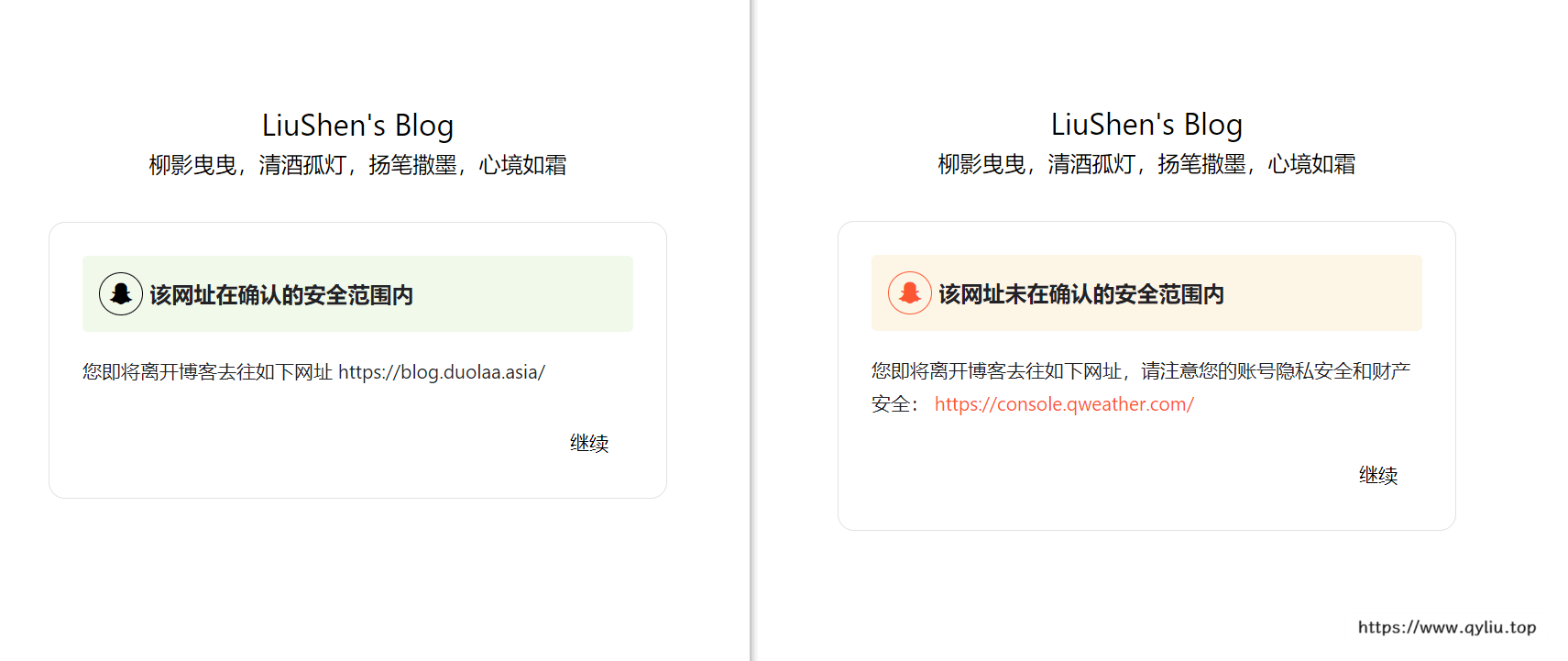
但是经过检查,原作者的友链需要自己手动添加,这对于我一个蓝狗,不可能,绝对不可能!于是我尝试了读取我的友链信息,恰好我的根目录下有一个friend.json,格式如下:
{
  "friends": [
    [
      "LiuShen",
      "https://www.qyliu.top/",
      "https://pic.imgdb.cn/item/65d5a5739f345e8d03290761.png"
    ],
    [
      "Yu Sir",
      "https://gaoyuyugao.github.io",
      "https://pic.imgdb.cn/item/65d89afa9f345e8d03e395e2.png"
    ],
      ……
}
其中是我的友链和相关头像链接信息,这个文件是为了构建友链朋友圈而使用,由于我魔改了友链页导致原有的友链朋友圈无法通过标签爬取到我的友链信息,没办法,只能根据其开发文档使用了第一条通用规则,自行生成json文件并上传,每次刷新从这里面读取最新的内容一个个爬取才能成功获取到大家的最新文章,我太难了~,获取到这个friend.json的文件如下:
const YML = require("yamljs");
const fs = require("fs");
let friends = [],
  data_f = YML.parse(
    fs
      .readFileSync("source/_data/link.yml")
      .toString()
      .replace(/(?<=rss:)\s*\n/g, ' ""\n')
  );
data_f.forEach((entry, index) => {
  let lastIndex = data_f.length - 3; // 获取友链数组的范围(除了最后,前面的都获取)
  if (index < lastIndex) {
    friends = friends.concat(entry.link_list);
  }
});
// 根据规定的格式构建 JSON 数据
const friendData = {
  friends: friends.map(item => {
    return [item.name, item.link, item.avatar];
  }),
};
// 将 JSON 对象转换为字符串
const friendJSON = JSON.stringify(friendData, null, 2);
// 写入 friend.json 文件
fs.writeFileSync("./source/friend.json", friendJSON);
console.log("friend.json 文件已生成。");
创建link.js,放入上面的内容并放到根目录下,根据[blogroot]/source/_data/link.yml爬取友链信息,所以该方法应该只能用于极少数类butterfly主题!!!
生成了friend.json之后,我们就根据读取并生成新的safeurl列表,首先我使用的是AJAX异步加载:
// // 使用AJAX加载friend.json文件
//    const xhr = new XMLHttpRequest();
//    xhr.open('GET', 'friend.json', true);
// // console.log(xhr);
//    xhr.onload = function () {
//        if (xhr.status === 200) {
//            try {
//                const friendData = JSON.parse(xhr.responseText);

//                const safeUrls = friendData.friends.map(friend => {
// 				let url = friend[1];
// 				url = url.replace(/\/$/, ''); // 移除结尾斜杠 "/"
// 			    url = url.replace(/^https?:\/\//, ''); // 移除http://或https://
// 			    return url;
// 			}); // 提取友链的链接部分
//                // 更新config对象中的safeUrl数组
//                config.safeUrl = config.safeUrl.concat(safeUrls);
//                console.log('safeUrl已成功更新:', config.safeUrl);
//            } catch (error) {
//                console.error('解析JSON数据出错:', error);
//            }
//        } else {
//            console.error('加载文件失败:', xhr.statusText);
//        }
//    };
//    xhr.send();
嗯,没错,我都屏蔽了,因为用不了。。。
其实可以看见,内容是正常的更新了的,如下:
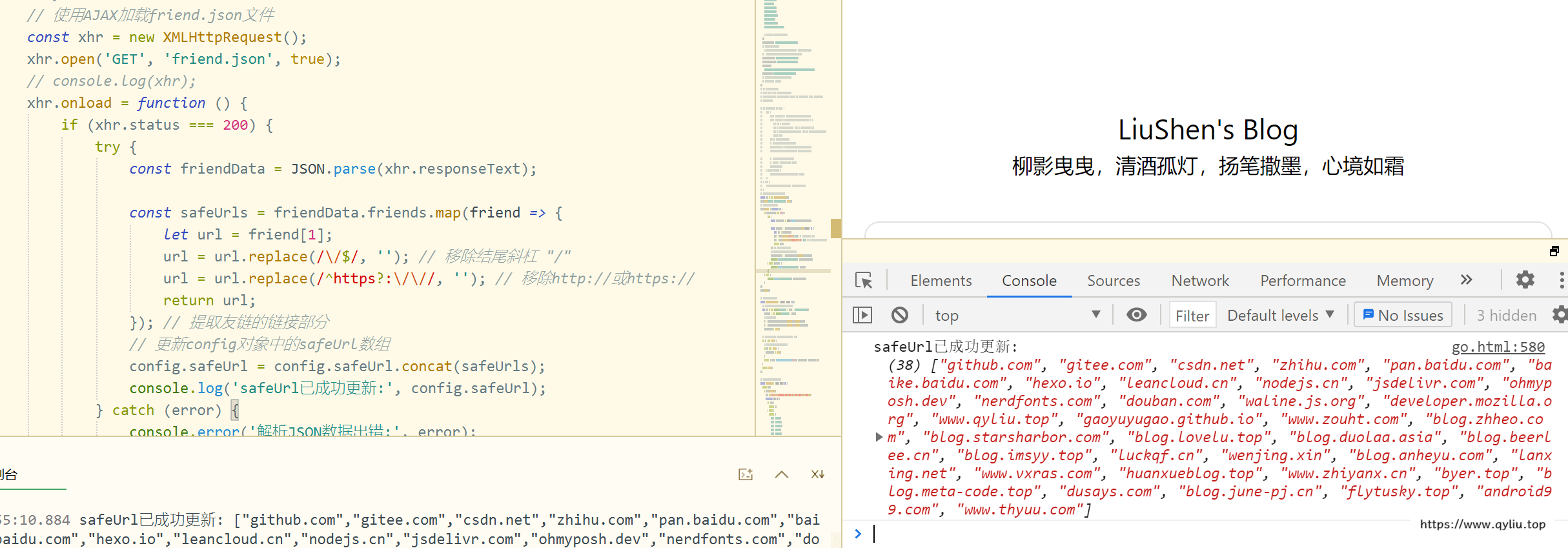
经过我上网查了资料,了解到,异步AJAX会同步新开启一个线程,这个没执行完的时候,下面的代码仍然会继续执行,所以导致还没有刷新列表,就已经跳转了不安全界面。那解决方法也很简单,异步改成同步呗(就是可能会导致加载不出文件一直进行不了下一步,不过加载不出文件导致页面崩溃也不只这一个问题了,多一个又何妨?QAQ),如下:
// 发送同步AJAX请求
const xhr = new XMLHttpRequest();
xhr.open("GET", "friend.json", false); // 第三个参数为 false 表示同步请求
xhr.send();

if (xhr.status === 200) {
  try {
    const friendData = JSON.parse(xhr.responseText);
    const safeUrls = friendData.friends.map(friend => {
      let url = friend[1];
      url = url.replace(/\/$/, ""); // 移除结尾斜杠 "/"
      url = url.replace(/^https?:\/\//, ""); // 移除http://或https://
      return url;
    }); // 提取友链的链接部分
    // 更新config对象中的safeUrl数组
    config.safeUrl = config.safeUrl.concat(safeUrls);
    console.log("safeUrl已成功更新:", config.safeUrl);

    // 在数据加载完成后执行其他操作
    // 可以调用 goInit(config) 函数等
    goInit(config);
  } catch (error) {
    console.error("解析JSON数据出错:", error);
  }
} else {
  console.error("加载文件失败:", xhr.statusText);
}
上面可以看到,我们在数据加载完成后才进行了goInit(config)函数操作,这样就可以确保不会出现先加载页面才加载完数据的问题。
下面就是butterfly的本身问题,应该可以发现我的html代码顶部有一个:
---
layout: false
--- 这个是为了防止我们的跳转页面被butterfly渲染而导致下面这个情况:
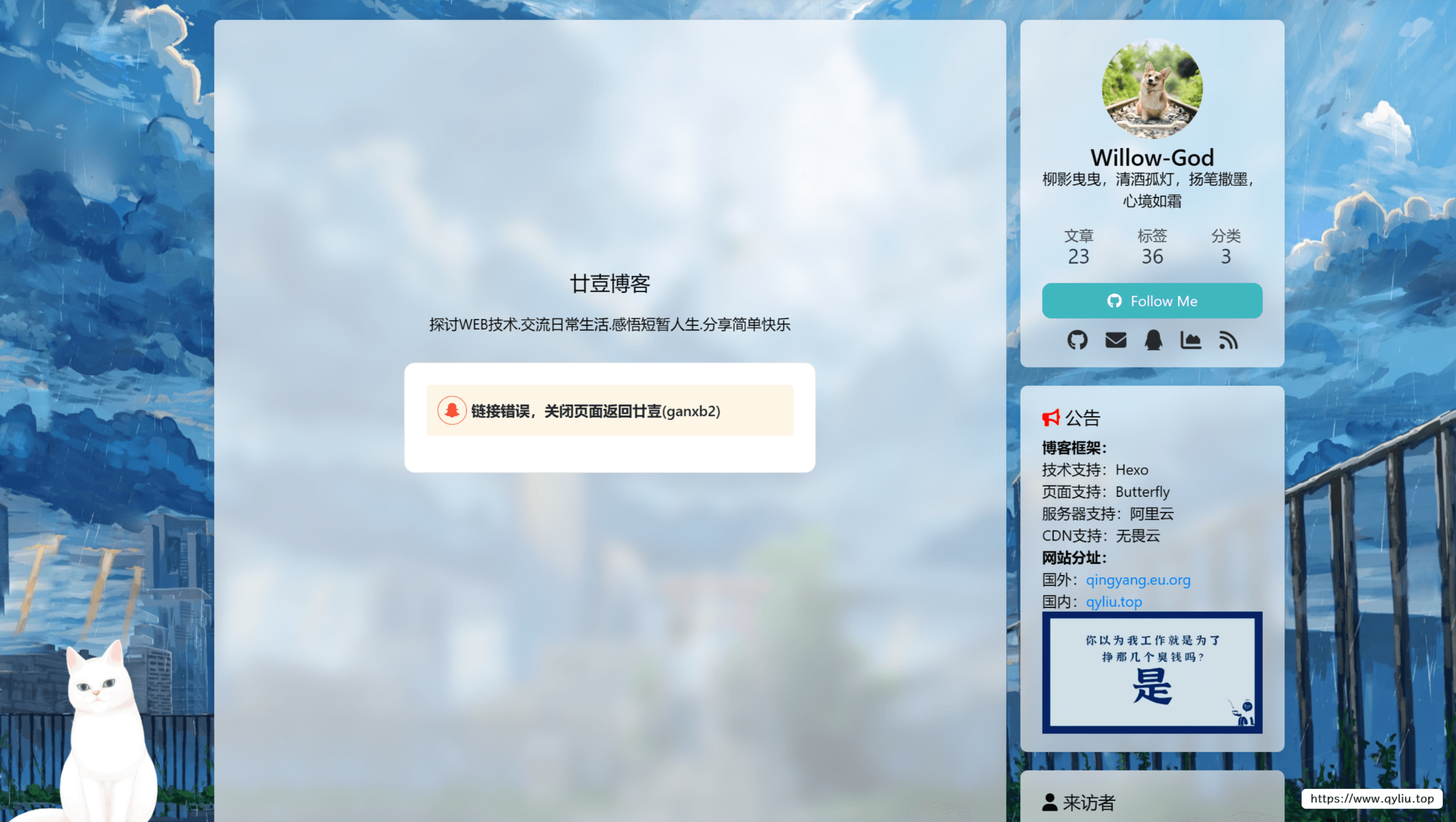
twikoo安全跳转
在与无名小栈站长交流的过程中,我发现他的博客中的评论区同样被安全跳转所包裹,于是我向他请教,最终实现了twikoo的安全链接跳转页面,其他聊天系统理论上也可以使用该方法进行重定向。
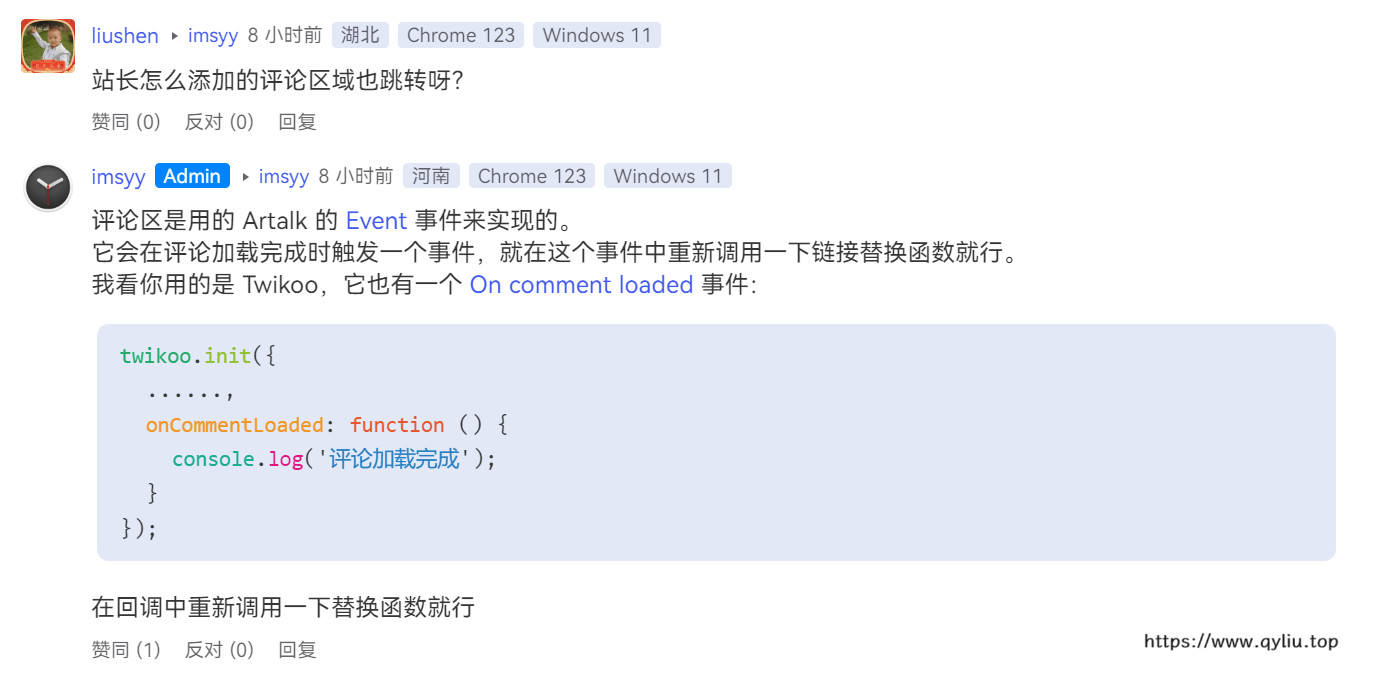
通过上方交谈我们可以了解到,当他加载完成后会执行一个函数,我们只需要知性这个个函数,然后识别其中的a标签,然后替换即可,通过翻找twikoo的issue,最终发现了一段类似的带么,可以直接用于重定向到我们的网页。
站外引用 · 引用站外地址,不保证站点的可用性和安全性github@twikoogithub.com/imaegoo通过搜索,最终定位到文件:[blogroot]themes\butterfly\layout\includes\third-party\comments\twikoo.pug,修改其中的代码:
……
const init = () => {
   twikoo.init(Object.assign({
     el: '#twikoo-wrap',
     envId: '!{envId}',
     region: '!{region}',
     onCommentLoaded: () => {
       btf.loadLightbox(document.querySelectorAll('#twikoo .tk-content img:not(.tk-owo-emotion)'))
       console.log('评论加载完成,开始替换相关链接');
       document.querySelectorAll('a').forEach(function(aEl){
         if(!aEl.href.startsWith(window.location.origin)){
           aEl.href='/go.html?goUrl='+encodeURI(aEl.href);
         }
       });
     }
   }, !{JSON.stringify(option)}))

   !{count ? 'GLOBAL_CONFIG_SITE.isPost && getCount()' : ''}
}
……
最终就可以实现twikoo的评论区安全链接跳转功能啦!理论上只要找到对应的触发事件,所有的评论系统都可以进行!
结束撒花!
--- 柳影曳曳,清酒孤灯,扬笔撒墨,心境如霜